Skip to content

Cookies on CheckBiz360

We use necessary cookies to make this site work. With your permission, we use Google to understand which information is useful and improve how we present CheckBiz360 to you. You can accept, reject or change your choice at any time. Read the cookie policy

Cookie settings

Choose what you want to allow. You can change your mind at any time from “Cookie settings”, at the bottom of the page. Read the cookie policy

NecessaryAlways on

They make the site work and remember this very choice, so we don’t have to ask you again. They identify no one and never leave this site, so they don’t depend on your permission.

They tell us which of our ads bring visitors and which don’t, so we stop spending on the ones that fail. That’s Google Tag Manager (Google Analytics and Google Ads): it sets first-party cookies and sends data to Google Ireland.

CheckBiz360by EncodeBiz

Team and operations management

Connect your team’s daily work
with control of your business.

Coordinate people, tasks and working hours across sites, services and projects. Review completed work, keep signed document records and check labour costs in one platform.

From €2 per employee/month · 15-day trial · Onboarding and training included

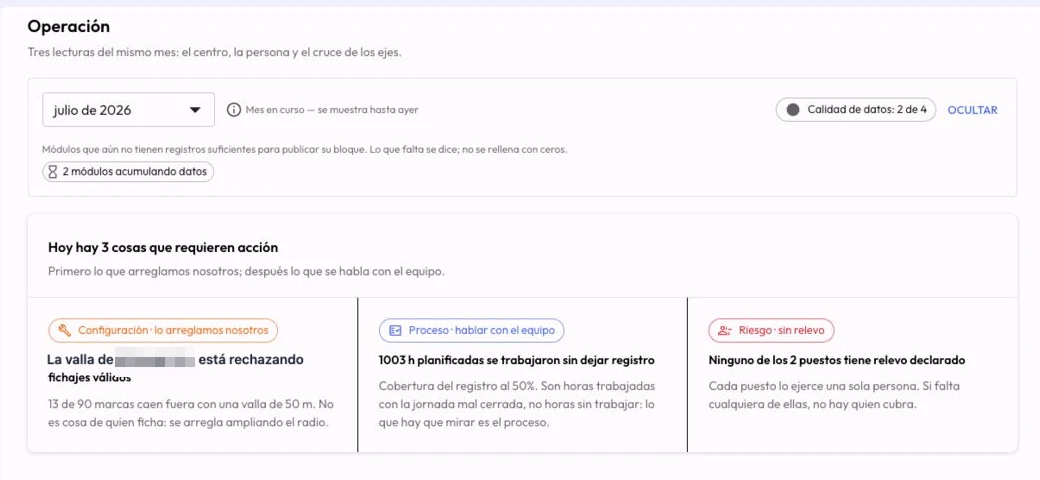
CheckBiz360 Operations dashboard showing the reporting period, data quality and issues requiring attention
Your operations signals in one dashboard, helping you decide what to review. Actual screenshot in Spanish.

Companies with teams across several sites, projects or out in the field already run on CheckBiz360.

  • Litoral Group IT Solutions
  • ACB2s Painting Services
  • Ferrada Painting Services LLC
  • Arendel Technology
When work happens across sites

Your team is getting things done.
The information should reach you too.

Between calls, job reports and messages, it is hard to know who is available, what is still pending and which documents each person has received. Bring the context together to coordinate the next step.

  • Who is available today?Checking leave and availability should not mean rebuilding every team.
  • Completed or reviewed?A completed task still needs evidence and a manager’s review.
  • Who received the document?Find the signed confirmation and the version each person received.
  • Where did the material go?With Inventory, link consumption to tasks and equipment to handovers.
Connected operations

People, work and documents in one place.

See it in a demo →
  • Teams and availability

    Reuse team templates and check availability against schedules, public holidays and leave. Organise each site with the people you need.

    • Team templates
    • Availability by site
    • Working days
  • Work you can review

    Assign tasks, check their status and review notes, photos and videos. Managers validate the result or reject it with a reason the worker can read.

    • Tasks and evidence
    • Validation
    • Incidents
  • Documents signed from the phone

    Send individual or group documents. Keep a record of who signed, when and which version they received, with a downloadable signing record for each confirmation.

    • In-app signing
    • Versions
    • Downloadable records
  • Data that helps you act

    Review costs based on validated working days and configured rates. The Operations dashboard and its AI assistant help you review priorities with context.

    • Costs by site
    • Operations dashboard
    • AI included
Inventory · CheckBiz360 add-on

Make your materials accountable too.

See what is left in each warehouse, what each task consumes and who holds each machine or PPE item. Connect materials with the work and people you already manage.

  • Stock, reservations and consumption by task.
  • Equipment and PPE handovers, returns and documents.
Explore the Inventory add-on

Requires a CheckBiz360 plan. Inventory is a paid add-on, billed separately.

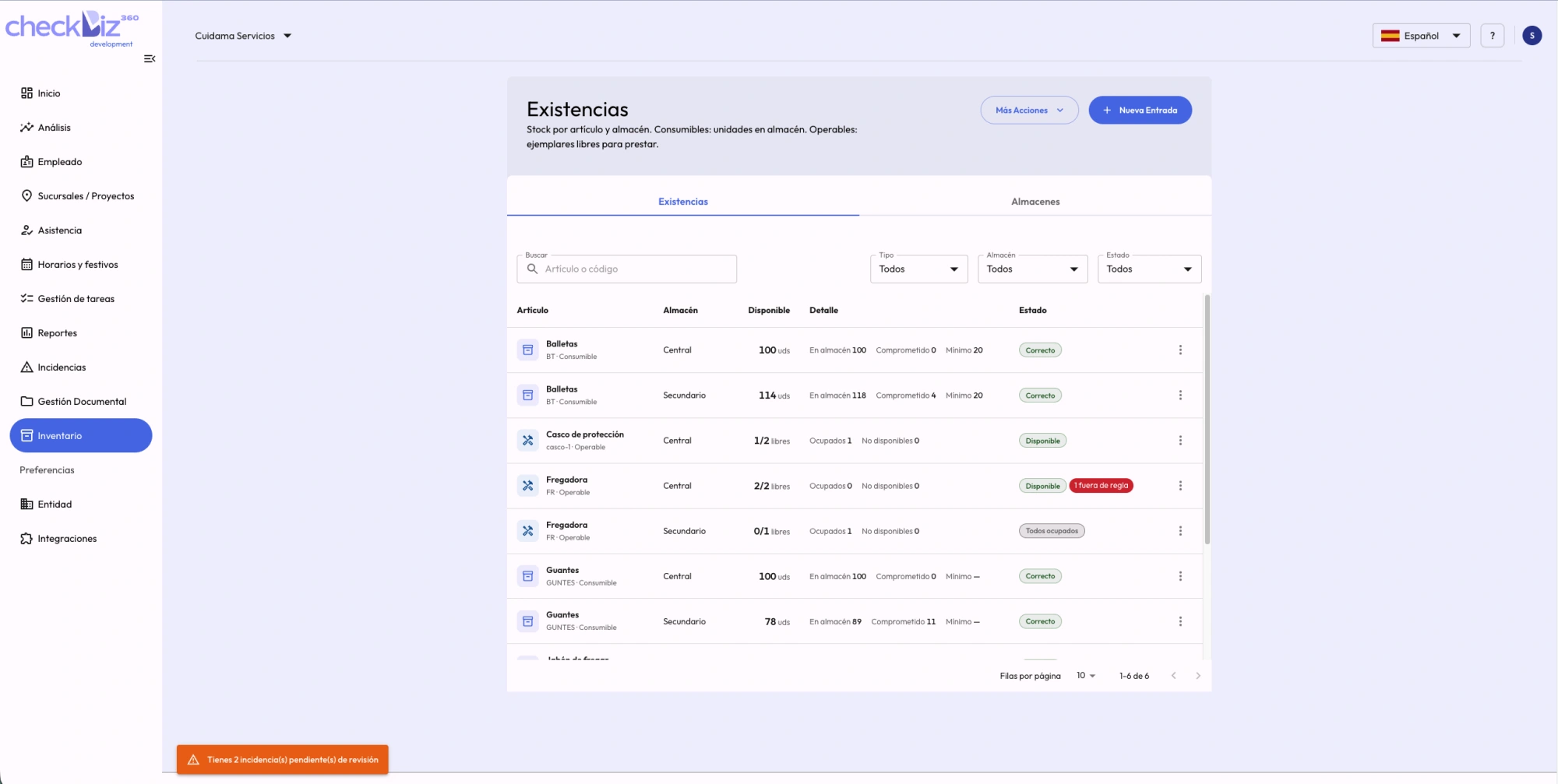
Consumable and equipment stock by warehouse in CheckBiz360
Availability and status by warehouse. Actual screenshot in Spanish.

Good morning, Marta

Monday, 14 April

Morning shift · 09:00 – 17:0008:57Clock in
Madrid · WarehouseLocation validated by GPS
This week
Hours
31:20
Shifts
4
Tasks
9/9
CheckBiz360 mobile app: an employee clocking in with shift and location validated by GPS.
From the team to the manager

Organise, record and review.

  1. Prepare the work

    Check availability, organise teams and assign tasks and documents to each person.

  2. The team records from the phone

    View tasks, log working hours, add evidence, report incidents and confirm documents.

  3. Review and decide

    Validate the results and review operational data. With Inventory, also check consumed materials and outstanding returns.

Operational intelligence

Find what needs attention. Understand why.

The Operations dashboard brings together signals from your sites, reliance on key people and role coverage. Its AI assistant explains those figures and helps you prioritise. Review costs using validated working days and the rates you configure.

The dashboard is monthly; the current month includes data up to yesterday. Indicators need history and support the manager’s review.

See operational intelligence in a demo →
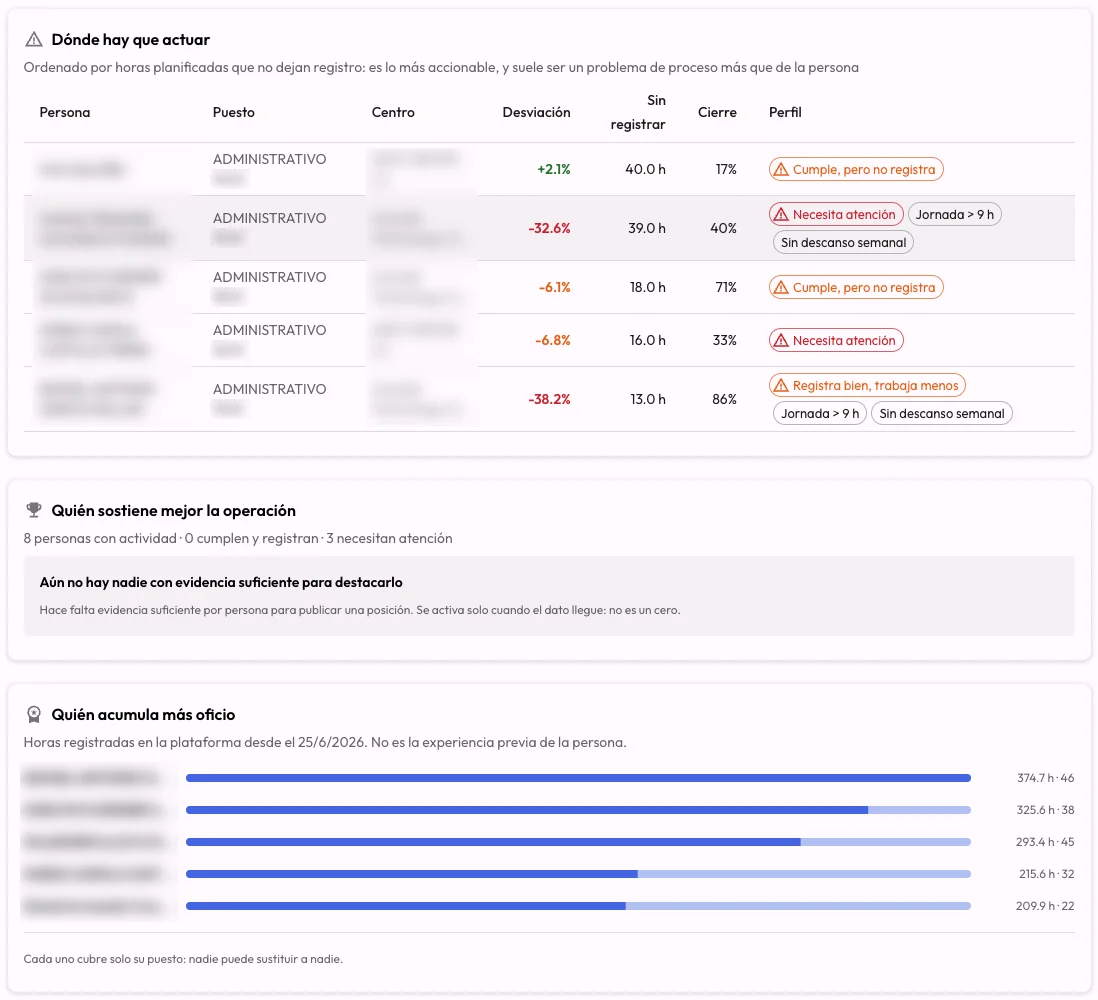
Employee view of the Operations dashboard showing reliance on key people and role coverage
See where to review team coverage. Actual screenshot in Spanish; identifying details hidden.
Staff rotas

Each person on the schedule that fits.

A site that changes shifts every week, a team that moves from job to job and an office that repeats its week are not organised the same way. Each branch and each person has its mode, and what you plan is what everyone sees in the app and clocks in against.

  1. By shifts

    The schedule is the shifts you load, week by week. A day with no shifts is off.

    Works best for home care services, cleaning, retail, hospitality, security and anywhere every week is different.

  2. By tasks

    Each task is a shift: each person’s day is their jobs, with a time and an address.

    Works best for home care, maintenance rounds and jobs at the customer’s site.

  3. Standard week

    The same week, every week. Set it once and it repeats itself.

    Works best for offices, admin and sites with fixed hours.

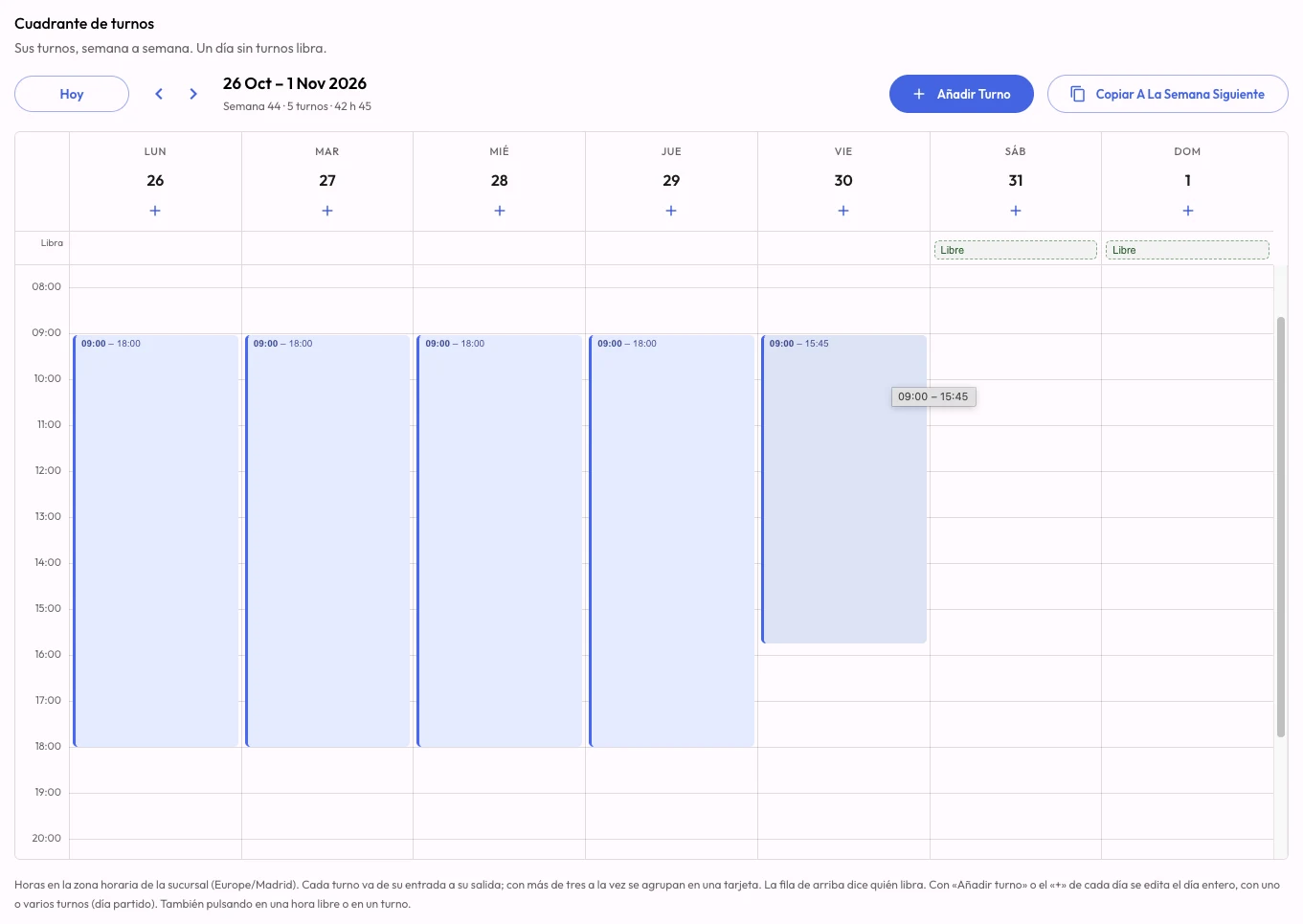
CheckBiz360 shift roster in the dashboard: a week with a shift from Monday to Friday, Saturday and Sunday off, and the Add shift and Copy to next week buttons.
The shift roster: each day with its shifts, days off at the top and «Copy to next week». Real dashboard screenshot.

They mix on the same site, and the week is loaded in the dashboard, copied to the next, uploaded from Excel or requested from the AI operations manager.

See how staff rotas work
Your AI operations manager

Ask Claude or ChatGPT. It gets done in CheckBiz360.

Building the week, onboarding new people, knowing who hasn’t clocked in this morning and who can cover them: the work that eats the afternoons of whoever runs the operation. Connect CheckBiz360 to your assistant and ask in your own words. It prepares everything with your permissions, shows you what it’s about to do and saves nothing until you say yes.

Things you can ask

  • How are we doing today? What should I look at first?
  • Lucía hasn’t clocked in. Who can cover her ten o’clock service?
  • Build North’s week like last week’s, but Marta is off on Thursday.
  • Onboard these twelve people and these three sites.
Sample conversationIllustrative
  1. You

    Lucía hasn’t clocked in and she has the 10:00 service at North Site. Who can cover her?

  2. Assistant

    For today’s 10:00 to 12:00 service at North Site:

    Free
    Marta R. · shift 8:00 to 15:00, nothing scheduled at that time.
    With caveats
    Pablo S. · has another service until 10:30.
    Unavailable
    Andrés L. · on holiday.

    Who should I assign it to?

  3. You

    Marta.

  4. Assistant

    10:00 to 12:00 service at North Site. Before: Lucía G. After: Marta R. Shall I apply it?

  5. You

    Yes.

  6. Assistant

    Done. Marta already has the service on her phone.

Answers come from your company’s data in CheckBiz360. Names and sites are made up for the example.

  1. Connect

    Once, with a single address that works for every company you manage. Two minutes.

  2. Ask

    In Claude or ChatGPT, in your own words: “how are we doing today?”, “build”, “change”, “onboard”, “who…?”.

  3. Review and confirm

    It shows you what it’s about to do, with the before and after. It only applies it when you say yes.

What protects you

  • It acts with your permissions, checked on every request: nothing you couldn’t do yourself in the dashboard.
  • Nothing is saved without your confirmation. Close the conversation without a yes and nothing happens.
  • You can see which assistants are connected to your company and disconnect them from Tools instantly.

For owners and administrators with two-factor authentication enabled. You need your own Claude or ChatGPT account; a company account is advisable, because your operation’s data travels to that service.

Admin time

What you stop doing by hand.

Five jobs that today get done screen by screen, spreadsheet first, and that with the operations manager become ask, review and confirm. How long they take you today is something only you know: put it in and add it up.

  • Building the week

    TodayRota in a spreadsheet, entered into the platform person by person, then telling everyone their hours.

    With the operations manager“Build North’s week like last week’s.” It proposes it person by person, shows it with a spreadsheet, and everyone gets it on their phone when you confirm.

  • Onboarding people and sites

    TodayCopying the payroll provider’s list record by record, with every site address.

    With the operations managerPaste the list, the spreadsheet or a photo. It tells you what it will create, what already exists, and creates it when you confirm.

  • Covering a last-minute absence

    TodayChecking shifts, calling three people and redoing the assignment by hand.

    With the operations manager“Who can cover the ten o’clock service?” Free, with caveats and unavailable, each with the reason. You choose and it makes the change.

  • Knowing how the day is going

    TodayChecking site by site who has clocked in, who is late and which task hasn’t started.

    With the operations manager“How are we doing today?” It starts with what needs attention, site by site.

  • Reports and month-end

    TodayExporting, filtering and assembling the working-time report and the cost comparison by hand.

    With the operations manager“Send me October’s working-time report for North Site.” PDF or Excel with a link, and this month’s costs against last month’s whenever you ask.

Hours a week you currently do by hand9 h · ≈ 39 h a month

That time becomes ask, review and confirm.

Example values for a service company with several sites. Replace them with yours: the figure is yours, not a promise of ours.

Go through your case in a demo
Working-time record guarantees compared with spreadsheets or paper
GuaranteeSpreadsheet / paperCheckBiz360
Timestamp to the secondNoYes
Unalterable historyNoYes
Corrections with a reasonNoYes
Employee accessManualIn the app
4-year retentionFragileAutomatic
Compliance

The calm of having it all in order.

A record built to Spain’s RDL 8/2019: tamper-proof, traceable, with employees able to see their own hours from the app and four years of retention. Paper and editable spreadsheets don’t offer the same guarantees under inspection; CheckBiz360 does.

Get your company inspection-ready
Already running an ERP?

It doesn’t replace your ERP. It completes it.

CheckBiz360 sits alongside your ERP and adds what it doesn’t cover: legal working-time compliance, field tasks and your team’s document records. If you need it integrated with your system, the EncodeBiz team handles it: just ask and we’ll assess whether it’s feasible.

  1. You ask

    Tell us which ERP you run and what data should travel between systems.

  2. We assess it

    We check your ERP meets the minimum conditions: an available API, permissions and identifiable data.

  3. We build it

    If it’s feasible, the EncodeBiz team develops and maintains the integration. You set nothing up.

We’re a software company: if your operation needs something bespoke, that’s a conversation, not a closed ticket.

Request an integration assessment
Sectors

Different sectors. The same need to coordinate work.

  • Construction and installation

    Organise crews and tasks by project, record working hours and review labour costs using configured rates.

  • Cleaning and maintenance

    Coordinate services across sites, review evidence and, with Inventory, link material consumption to each task.

  • Events and AV

    Assign teams and tasks at each venue, record working hours and report incidents from the phone.

  • Hospitality

    Check availability, organise shifts and send documents to your team with signed confirmations.

  • Multi-store retail

    Review tasks and working hours by store and get an overview of your sites from the office.

  • Logistics and field services

    Connect mobile teams with their managers through tasks, evidence, incidents and documents.

  • Your sector not here? Tell us how you operate and we’ll say whether we’re a fit.

    Let’s talk →
Social proof

Companies like yours, in their own words.

End-to-end operations management
“It gave us something we didn’t have: order and real visibility. Reports come out ready and the hours add up.”

We run crews across different projects and everything used to depend on WhatsApp and loose spreadsheets. Today we know which team is active, where and for how long, without chasing anyone.

Luis M. AcevedoOwner & CEO · ACB2s Painting Services
Teams and projects in the field
“I used to feel we were managing blind; now we work with data.”

Our teams move between clients and locations. Recording attendance by project and location was essential. It’s not about surveillance, it’s about managing with judgement.

Michel FerradaOwner & Project Supervisor · Ferrada
Decisions on real metrics
“Today we decide on objective information, not assumptions.”

We needed something flexible for different roles and projects. The dashboards let us spot patterns, optimise resources and get ahead, with no friction for employees.

Yoan CéspedesHead of Operations · Litoral Group
Plans

Start with what you need today. Scale up as you grow.

Bronze brings together teams, tasks, time tracking, documents and AI analysis. Bespoke integrations are assessed under Enterprise.

€5€2per employee per month2026 rate

Subscribe at €2 per employee per month up to and including 31 December 2026, and keep your rate. From 01/01/2027, new subscriptions will be charged €5.

15-day trial on your first subscription · Onboarding and training included.

Inventory is an optional add-on, billed separately from your CheckBiz360 plan.

We review our rates once a year so we can keep developing the platform. Any change is announced in advance.

Bronze

Coordinate your team and review their work.

€5€2per employee per month

Subscribing up to and including 31/12/2026. You keep your rate.

Records and legal compliance

  • Clock-in with geolocation (GPS/geofence) and biometric check.
  • Tracking of hours worked.
  • Reusable team templates and an availability board for each site.
  • Assignment of employees to the available site/project.
  • Setup of public holidays, leave and scheduled absences.
  • Ticketing system for incidents, reports and direct communication.
  • Reports and export (CSV).

Task management

  • Task assignment to one or several workers by shift, site or project.
  • Evidence attached from the app: photo or video of the work done.
  • Supervision with approval or rejection of each task from the dashboard.
  • Worker rating from 1 to 5, with a comment.
  • Tasks with their own location, pauses and execution history.
  • Automatic alert when a task doesn’t start on time.
  • Task report exportable to Excel.

Document management

  • Documents by company, site or employee: payslips, contracts, certificates, policies, risk prevention and more.
  • Visibility by role: worker, supervisor or manager.
  • Signed confirmations from the phone, linked to the document version, with downloadable signing records.
  • Expiry dates, archiving, search and filters.
  • Private storage with downloads via temporary signed links.

Analysis and performance control

  • Statistics and comparative reports across sites/projects.
  • Behaviour patterns at employee and site level.
  • Insights based on heuristic metrics and patterns updated daily, to improve performance and surface hidden costs.
  • AI assistant included, to analyse the operation and support coordination decisions.
  • Standard support: defined response times + operational help.
Book your demo
Bespoke
Enterprise

Discover everything we can do.

Built for companies with 100+ employees.

  • Everything in the Bronze plan.
  • Full support (priority channels).
  • ERP/CRM integrations and bespoke development (by agreement).
  • Webhook integrations.
Book your demo

We set it up for you and train your team. At no extra cost and with no lock-in to get started.

Prefer to create the account yourself? Sign up here

Frequently asked questions

What can I manage with CheckBiz360?

Teams, availability by site, working days, tasks with evidence, incidents, documents and signed confirmations. Managers review work and consult the Operations dashboard and costs based on configured rates.

Is Inventory included in my plan?

No. Inventory requires a CheckBiz360 plan and is a paid add-on billed separately. It adds warehouses, consumption by task and equipment and PPE handovers; it is not a standalone application.

What do I get when a worker signs a document?

A confirmation linked to the person and document version, with a downloadable signing record. PDFs addressed to a single employee also support downloading a signed PDF. Signing requires consent and a compatible app version.

Is time tracking mandatory in Spain?

Yes. Since RDL 8/2019 every company must record the daily start and end time of each employee’s working day, keep those records for four years and make them available to the labour inspectorate, the employees themselves and their representatives. It applies regardless of company size or contract type.

What are the penalties for not keeping working-time records?

Failing to keep them — or keeping them in a way that doesn’t evidence actual hours — is a serious labour infringement: the usual range is €751 to €7,500 per workplace, and breaches of working-time or overtime limits can escalate to a very serious infringement. Current amounts are worth verifying, as they have been updated several times.

Is GPS-based clocking in legal?

Yes, provided it is proportionate and employees are informed. CheckBiz360 does not track continuously: it checks location only at the moment of clocking in, against the site’s geofence, and stores the distance at which it happened. Outside that moment no position is recorded, and for remote work the check is skipped entirely.

Can my manager change the hours I clocked?

Not unilaterally. When a manager corrects or creates a working day they must state a reason, and the record stays pending: it does not count towards hours until the employee accepts or rejects it from the app. The whole process — who, when, previous and new value — is kept in a history nobody can delete.

What if an employee forgets to clock in or has no signal?

The manager can create the full working day or close one left open, always with a reason. The employee gets a notification and validates it from the app, so the time ends up recorded by the employee’s acceptance. Failed clock-in attempts are stored too, which evidences a technical problem rather than an oversight.

Does it handle split, rotating or flexible shifts?

All three. Each day supports multiple shifts (true split days), for rotating shifts, the “By shifts” mode loads each person’s week, copies it to the next or imports it from the Excel rota; and a configurable entry tolerance that normalises the clock-in to the shift’s official time while keeping the original for audit. That way no phantom overtime appears because someone clocked in five minutes early.

Does it work for a company with several sites?

It was built for it. Schedules, public holidays and shifts resolve in a cascade — company, site and employee — where whatever is closest to the worker wins: configure once globally and adjust only the exceptions. Each site can have its own time zone, local holidays and managers, and the dashboard gives the consolidated view across all of them.

Can I manage several legal entities from one account?

Yes. One person can belong to several companies with a single login, and each company’s data stays completely separate: schedules, sites, documents, tasks and roles belong to that entity alone. Useful for groups and for contractors clocking in across several clients. Switching company requires logging in again.

Do I need to install any hardware?

No. Employees clock in from their phone, with no physical terminal or wall reader. Every clock-in passes three checks: location inside the site’s geofence, the shift’s effective schedule, and a trusted device with biometrics or 2FA. Where some people don’t clock in from their phone, the clock-in point turns a tablet into a shared station, with a QR or code and a photo of each clock-in. It is billed separately.

How much does it cost and what does onboarding include?

The 2026 rate for the Bronze plan is €2 per employee per month, subscribing up to and including 31 December 2026, and it is kept for as long as the subscription stays active. From 01/01/2027 new subscriptions will be charged €5. We review our rates once a year so we can keep developing the platform, and any change is announced in advance. Your first subscription includes a 15-day trial, and onboarding and training are included at no cost: we set up the company, sites, schedules and roles, and train both managers and employees. No lock-in to get started.

Does it integrate with my ERP?

Ask us and we’ll assess it: if your ERP meets a few minimum conditions (accessible API, permissions and identifiable data), the EncodeBiz team builds and maintains the integration. CheckBiz360 doesn’t replace your ERP — it adds the working-time compliance, field tasks and document records layer on top.

Does it work with ChatGPT and Claude?

Yes. CheckBiz360 is added as a connector to Claude and ChatGPT with a single address, valid for every company you manage. Owners and administrators with two-factor authentication enable it in two minutes, and the assistant works with the permissions of whoever connects it: it can tell you how the day is going, who can cover someone, build the week, onboard people and sites, analyse the month and produce the working-time report. You need your own Claude or ChatGPT account; a company account is advisable, because your operation’s data travels to that service.

Can the assistant change something without me seeing it?

No. Anything that changes the operation is proposed first: it shows you the before and after, or the whole week person by person with a spreadsheet to review, and only applies it when you confirm. Close the conversation without confirming and nothing happens. In Tools you can see which assistants are connected to your company, whose they are and when they were last used, and disconnect them instantly.

Stop reacting to your operation. Start running it.

15-day trial, onboarding and training included.

Message us on WhatsAppBook your demo