AI operations manager
CheckBiz360 in Claude and in ChatGPT
Ask in your own words. It gets done in your operation.
Who hasn’t clocked in this morning, who can cover them, building the week, onboarding new people, what is going on this month. Connect CheckBiz360 to the assistant you already use and hand it the job of running the admin side of your operation: it prepares everything with your permissions, shows it to you and saves nothing until you say yes.
For CheckBiz360 owners and administrators with two-factor authentication enabled, using their own Claude or ChatGPT account.
The operation is run in the morning. It is administered in the afternoon.
Whoever runs a team spread across several places spends the morning solving things and the afternoon writing them up: the rota, the onboarding, the record of who came, the report somebody asked for. That second job is invisible, and it is the one that doesn’t fit in the day.
The rota gets done twice
Once in the spreadsheet where it is thought out and again in the platform where it is applied, person by person. And a third time when somebody is off.
Onboarding arrives as a list
From the payroll provider, by email, with twelve names and three addresses. Entering them record by record is a whole afternoon.
Knowing how the day is going means walking through it
Site by site, screen by screen, only to find that what needed attention was in the third one.
The operations manager doesn’t change what you do. It changes how long it takes: you ask in a sentence, review and confirm.
Four jobs you do by hand today. And how to ask for them.
There are no commands to learn. You say it the way you would say it to someone on your team, and the assistant shows you what it is about to do before doing it.
Lucía hasn’t clocked in. Who can cover her ten o’clock service?
Covering for someone
It cross-checks the day’s availability, each person’s other tasks and, if it is today, who has clocked in. It answers with facts, in three groups: free, with caveats and unavailable, each with its reason.
You choose the person. The assistant makes the change with the before and after in front of you, and only when you confirm.
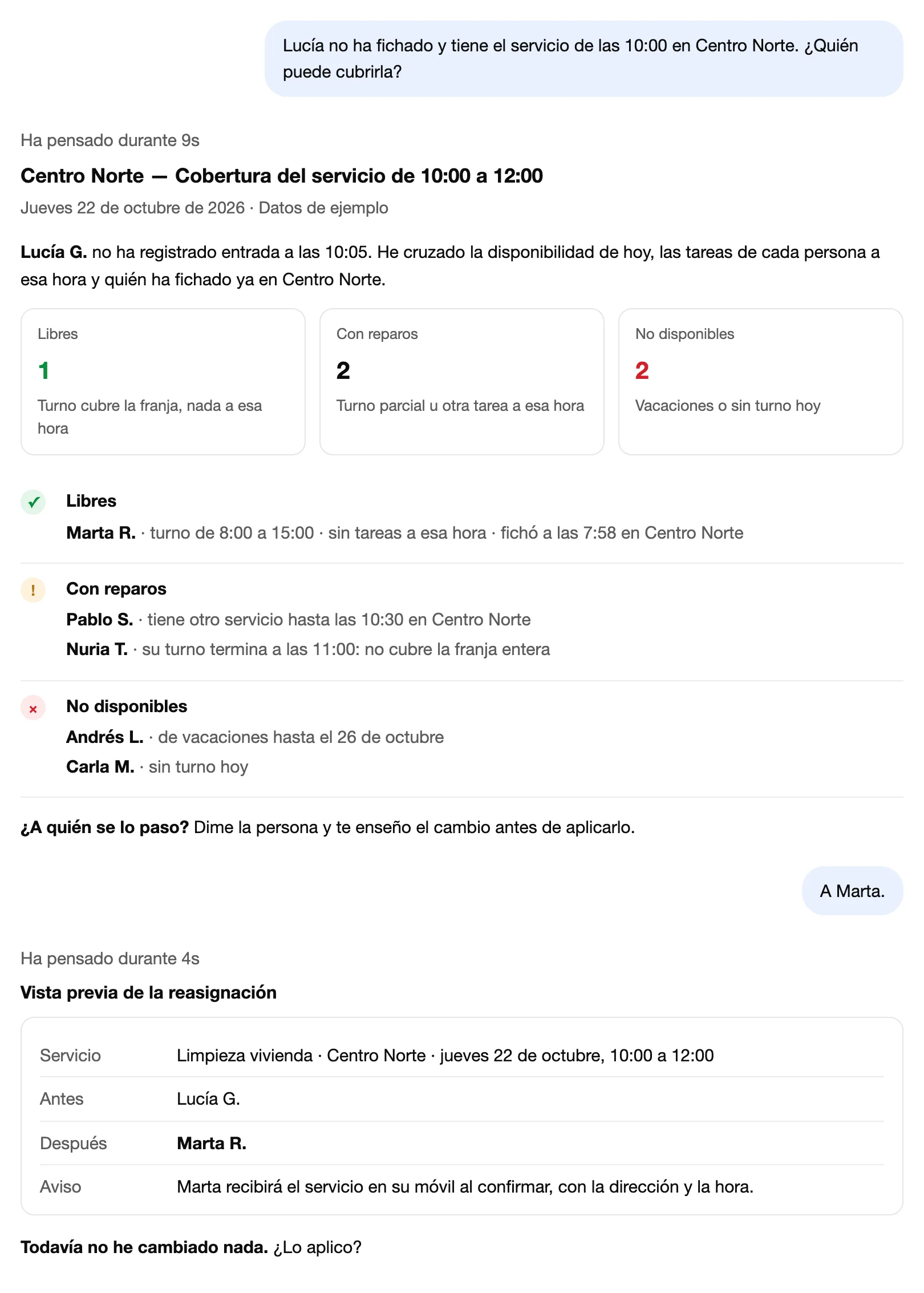
Free, with caveats and unavailable, with the reason. The reassignment waits for your yes. Conversation recreated with sample data, in Spanish. Build North’s week like last week’s, but Marta is off on Thursday.
Building the whole week
Copying the previous one, from scratch or from the rota your management software prints, a spreadsheet or a photo of the paper. It recognises your people and turns it into each person’s week, with the warnings worth looking at: two overlapping services, a public holiday.
It shows it to you person by person, with a spreadsheet to review at your own pace. Everyone gets their week on their phone when you confirm.
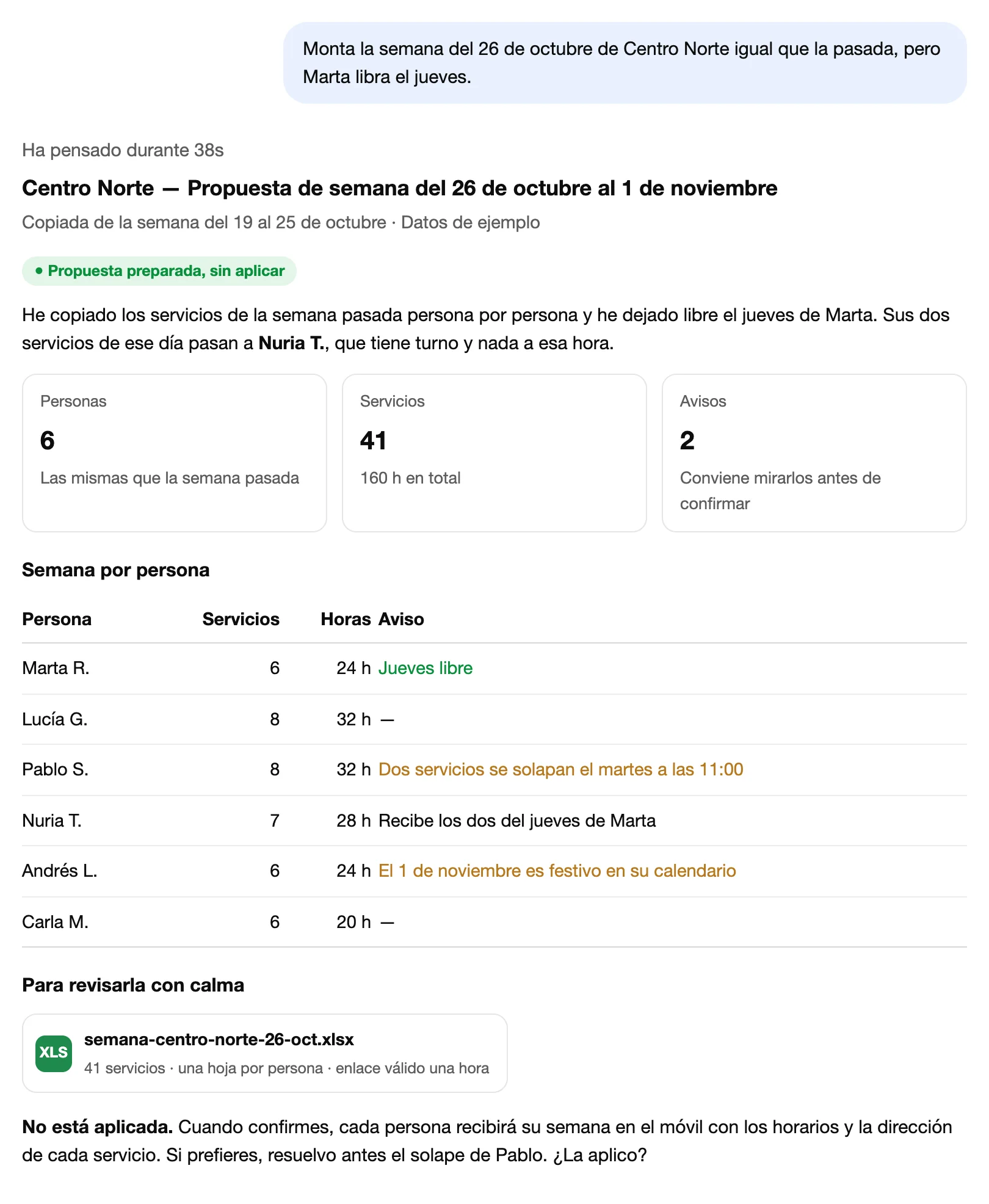
The proposal, person by person, with warnings and a spreadsheet. Nothing is applied until you confirm. Conversation recreated with sample data, in Spanish. Onboard these twelve people and these three sites.
Onboarding people and sites
Paste the list your payroll provider sent you, a spreadsheet or a photo. The assistant checks who already exists, tells you what it will create and which address it understood for each site.
It creates everything when you confirm. The app welcome message isn’t sent on its own: you ask for it once you have checked everything is right.
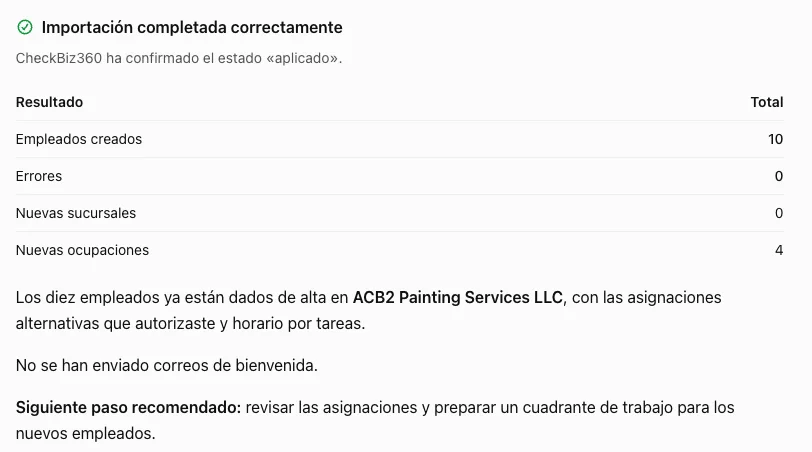
Ten people onboarded from a spreadsheet on confirmation. Welcomes are not sent until you ask. Real ChatGPT screenshot in Spanish with test people. What is going on this month?
Understanding the month
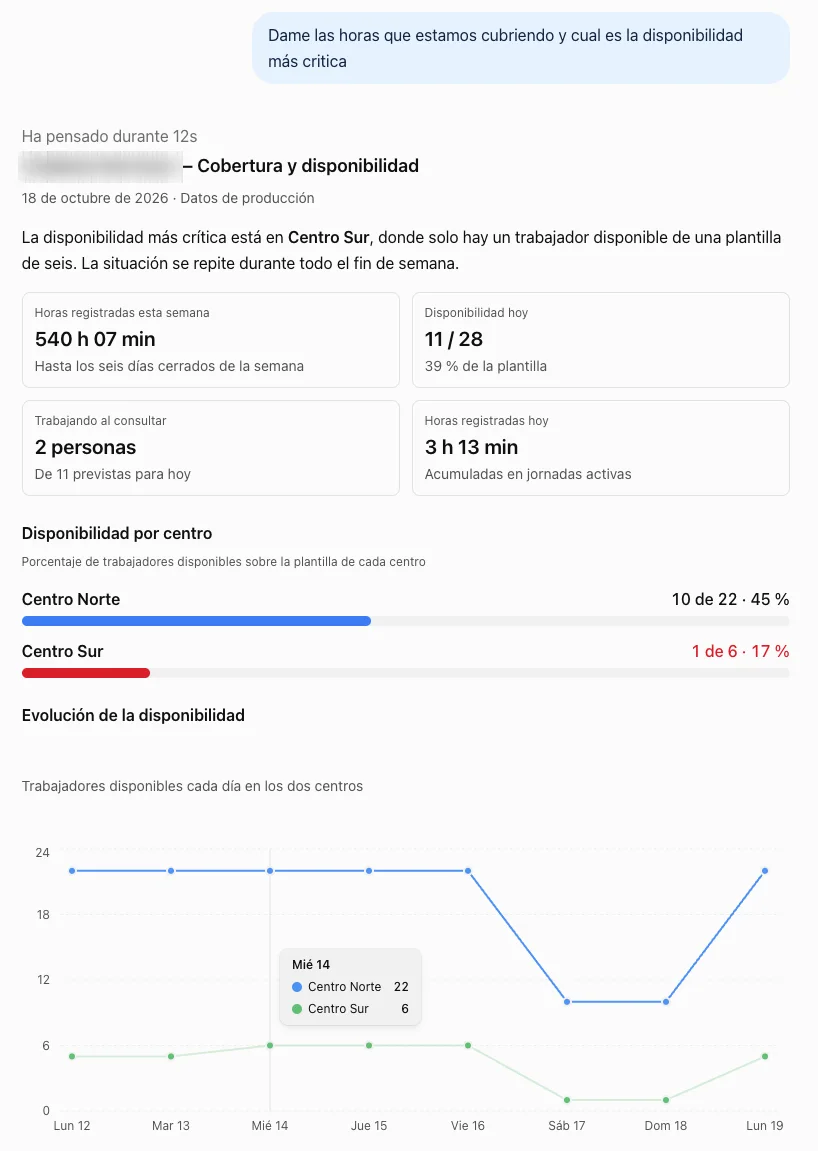
The same analysis as the dashboard’s Analysis tab: which site needs attention and why, who holds the operation together, where clocking in fails, planned versus worked hours, costs against last month and any statistic over a date range.
It doesn’t recite it: it tells you what one thing implies about another and what it would do first. And it produces the working-time report in PDF or Excel when you ask.
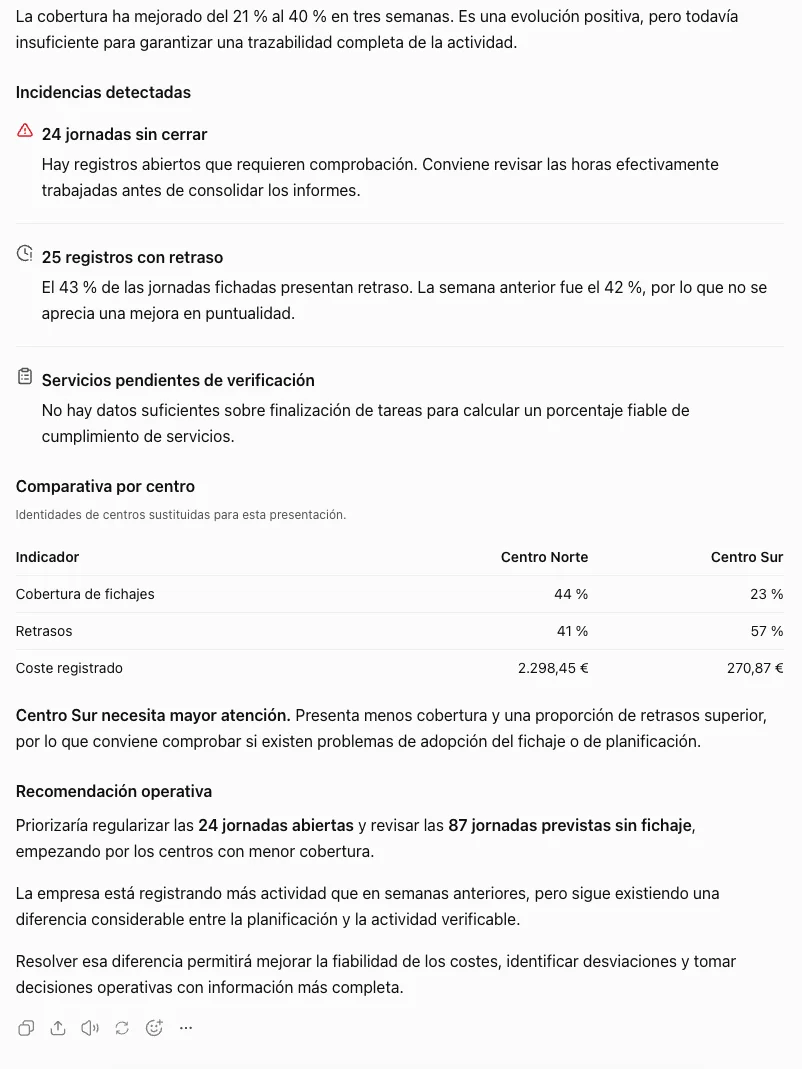
The analysis narrated and prioritised: which site needs attention, why and what it would do first. Real ChatGPT screenshot in Spanish; sites renamed by the assistant itself.
It says what it observes, not the cause: “hasn’t clocked in”, never “hasn’t come in”. CheckBiz360 knows the first; only you know the second.
Two minutes. Once.
One connection address for every company you manage. You will find it under Tools in your dashboard, with a button to copy it; it is not published anywhere else.
Connect
In Claude: Settings → Connectors → Add custom connector. In ChatGPT: Apps and connectors → Create. Paste the address, sign in with your CheckBiz360 user and verification code, and authorise.
Ask
In your own words: “how are we doing today?”, “build”, “change”, “onboard”, “who…?”. If you manage more than one company, it asks which one to work with and names it in every change.
Review and confirm
It shows you what it is about to do, with the before and after or the whole week. It only applies it when you say yes. Close the conversation and nothing happens.
You need two-factor authentication enabled and to be owner or administrator of at least one company. If it won’t let you in when connecting, it is almost always one of those two.
You see who is connected. And you cut it off whenever you want.
An assistant that acts on your operation has to be as controlled as a person with access to the dashboard. It is.
With your permissions, on every request
It can do nothing you couldn’t do yourself in the dashboard. No more, no less.
Nothing is saved without your yes
Anything that changes the operation is proposed first and applied when you confirm, with an explicit yes.
Whoever stops administering stops getting in
If you remove a collaborator or deactivate them, their assistant loses access to the company at that very moment.
You see it and you disconnect it
Under Tools, every assistant connected to your company: whose it is, whether it is Claude or ChatGPT and when it was used. Disconnect, and it loses access instantly.
It doesn’t guess who you mean
If a name is unclear or two people are similar, it asks, showing each one’s email.
When you connect, your team’s names and the operation’s data are sent to the Claude or ChatGPT account you use. It should be a company account, not a personal one, and you should check what that service does with your data.
Request a demoWhat you stop doing by hand.
Five jobs that today get done screen by screen, spreadsheet first, and that with the operations manager become ask, review and confirm. How long they take you today is something only you know: put it in and add it up.
Building the week
TodayRota in a spreadsheet, entered into the platform person by person, then telling everyone their hours.
With the operations manager“Build North’s week like last week’s.” It proposes it person by person, shows it with a spreadsheet, and everyone gets it on their phone when you confirm.
Onboarding people and sites
TodayCopying the payroll provider’s list record by record, with every site address.
With the operations managerPaste the list, the spreadsheet or a photo. It tells you what it will create, what already exists, and creates it when you confirm.
Covering a last-minute absence
TodayChecking shifts, calling three people and redoing the assignment by hand.
With the operations manager“Who can cover the ten o’clock service?” Free, with caveats and unavailable, each with the reason. You choose and it makes the change.
Knowing how the day is going
TodayChecking site by site who has clocked in, who is late and which task hasn’t started.
With the operations manager“How are we doing today?” It starts with what needs attention, site by site.
Reports and month-end
TodayExporting, filtering and assembling the working-time report and the cost comparison by hand.
With the operations manager“Send me October’s working-time report for North Site.” PDF or Excel with a link, and this month’s costs against last month’s whenever you ask.
That time becomes ask, review and confirm.
Example values for a service company with several sites. Replace them with yours: the figure is yours, not a promise of ours.
Go through your case in a demoFor whoever runs the operation and doesn’t have an office shift.
Cleaning and maintenance
Several sites, services that change every week and absences that must be covered before ten.
Home care
Rotas per carer, timed visits and a coordination that lives on the phone.
Construction and installations
Crews per site, onboarding that arrives from the payroll provider and daily records to close.
Events and builds
Crews that move between venues, weeks that get built on Friday and a warehouse that clocks in too.
Frequently asked questions
What do I need to use it?
A CheckBiz360 account in which you are owner or administrator of at least one company, two-factor authentication enabled and your own Claude or ChatGPT account. You connect once from the assistant’s connector settings, with the address you will find under Tools in your dashboard.
Can it change something without me seeing it?
No. Anything that changes the operation is proposed first: it shows you the before and after, or the whole week person by person with a spreadsheet to review, and only applies it when you confirm with an explicit yes. Close the conversation without confirming and nothing happens.
What happens to my team’s data?
When you connect, your employees’ names and the operation’s data are sent to the Claude or ChatGPT account you use, with your permissions and only while the connector is active. It should be a company account, and you should check what that service does with the data. You can remove the connector from the assistant or disconnect it under Tools whenever you want; from that moment it no longer has access.
Does it work if I manage several companies?
Yes, with the same connection. When you start it asks which one to work with, names the company in every change it proposes and never mixes companies in one action. To switch, just say so. If you are given access to another company tomorrow, it sees it without reconnecting; if access is removed, it stops seeing it.
What doesn’t it do?
Today it doesn’t touch inventory, task evidence or invoicing. It says what it observes, not the cause: “hasn’t clocked in”, never “hasn’t come in”. And it doesn’t decide for you: it proposes, shows and waits for your confirmation.
What if it suddenly stops working?
Reconnect from Claude or ChatGPT. It happens when someone disconnected it under Tools or when your access to your companies was removed. If it won’t let you in when connecting, check two-factor authentication and that you are still owner or administrator.
Bring your week. We build it in front of you.
Tell us how your team is spread out and what eats your afternoons. In the demo we connect the assistant to a demo company and ask it the same things you would.