
Before
Weekly sheet
- PDF printed on Monday
- Changes by phone call
- Incident reported on return
- Hours estimated by hand
Home care · dependency · social care
CheckBiz360 puts the rota on every care worker’s phone and turns each visit into a verifiable service: arrival, departure, point-in-time location, tasks, incidents and evidence.
2026 rate: €2 per employee/month, subscribing up to and including 31/12/2026. You keep your rate.
15-day trial on your first subscription · Onboarding and training included
No continuous GPS · No hardware · Built for care workers in the field

The rota may be perfect. The problem starts when the care worker leaves for the address and the company needs to know what actually happened.
The care worker has to interpret times, addresses and changes. When in doubt, coordination sorts it out by phone.
Knowing someone clocked in is not enough: in home care the visit has to be tied to an address and a service.
An absence or an unclosed visit can end in a complaint if coordination only sees it at the end of the day.
Working time, visit and travel are not the same thing. Without cross-checking them, the margin slips away unseen.
In front of a family, an audit or the local authority, the plan alone does not evidence the service delivered.
Every care worker needs to know where to go, which service to deliver and how to flag a problem. All of it at hand in the app, including for those less comfortable with a phone.
A care worker is assigned several visits in a week: different addresses, specific times, a service duration and journeys between homes. On paper or PDF, every change depends on phone calls and memory.
In CheckBiz360, each visit becomes an action inside the app: view, arrive, clock in, deliver, close or report an incident.

It is imported or built in the platform. Changes reach the phone without reprinting anything.
Visits, times and tasks. They also clock in for the working day according to the contract, agreement and schedule that apply to them.
Point-in-time location, scheduled time, status and notes. The visit is closed and the next one begins.
Delays, visits not started, closed visits and incidents, without waiting for the end of the day or chasing people on WhatsApp.
The start and end of the working day are not the start and end of each visit. Working time is recorded according to the applicable configuration; each address is a task with its own location and timings. The value appears when you cross the two.
The care worker opens the visit and finds the assigned service, where it has to be delivered and when it is scheduled. Working time and time spent at each address stay separate.
In this example, the app detects a distance of 3.5 km against a configured margin of 75 m, and asks the worker to get closer before starting the task.

What the care worker does at the address reaches coordination there and then. What coordination learns adjusts the next day’s planning.

Arrival, service tasks, notes or an incident, and closing. All in the app, no paper.

Delays, visits not started and incidents show up while there is still room to fix them.

Routes that did not fit the time allowed, services that run long, gaps between visits: the next rota starts from what actually happened.
Less paper, fewer PDFs, less WhatsApp. The care worker opens the app and the day is sorted.
Arrival, departure, address, service and status. Every visit is tied to something checkable.
Pending, started, completed or with an incident. Coordination sees it before it becomes a complaint.
Planned against actual, to review service times, journeys and deviations with a figure in front of you.
A traceable history of records, changes and incidents, with reports that support the justification of hours and services.
We do not replace what you already use: we study the fit case by case with rotas, workers, services or reports.
A site that changes shifts every week, a team that moves from job to job and an office that repeats its week are not organised the same way. Each branch and each person has its mode, and what you plan is what everyone sees in the app and clocks in against.
The schedule is the shifts you load, week by week. A day with no shifts is off.
Works best for home care services, cleaning, retail, hospitality, security and anywhere every week is different.
Each task is a shift: each person’s day is their jobs, with a time and an address.
Works best for home care, maintenance rounds and jobs at the customer’s site.
In home care, each visit is a shift, with its time and address, and clocking in happens at each address.
The same week, every week. Set it once and it repeats itself.
Works best for offices, admin and sites with fixed hours.
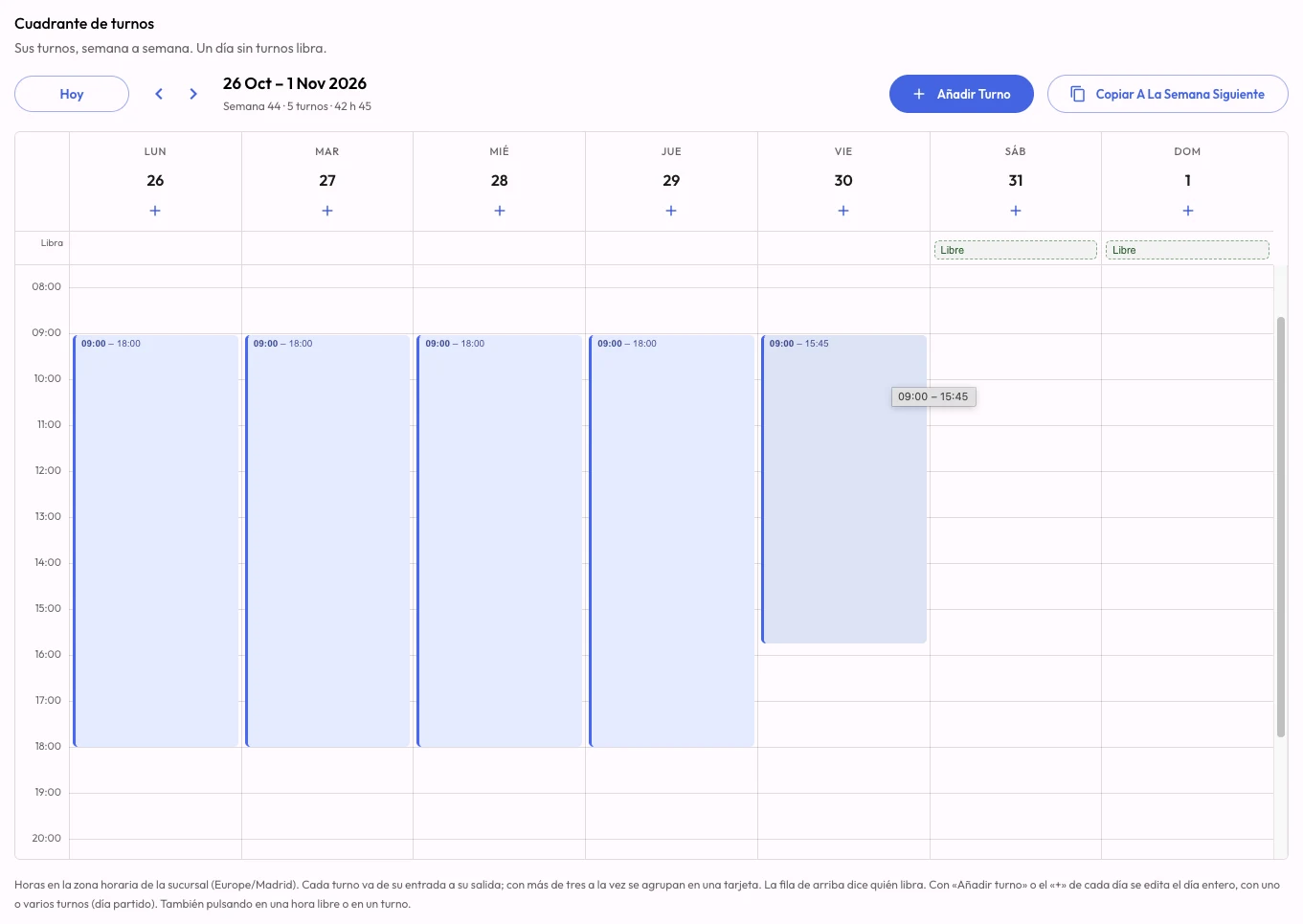
They mix on the same site, and the week is loaded in the dashboard, copied to the next, uploaded from Excel or requested from the AI operations manager.
See how staff rotas workBuilding the week, onboarding new people, knowing who hasn’t clocked in this morning and who can cover them: the work that eats the afternoons of whoever runs the operation. Connect CheckBiz360 to your assistant and ask in your own words. It prepares everything with your permissions, shows you what it’s about to do and saves nothing until you say yes.
Lucía hasn’t clocked in and she has the 10:00 service at North Site. Who can cover her?
For today’s 10:00 to 12:00 service at North Site:
Who should I assign it to?
Marta.
10:00 to 12:00 service at North Site. Before: Lucía G. After: Marta R. Shall I apply it?
Yes.
Done. Marta already has the service on her phone.
Answers come from your company’s data in CheckBiz360. Names and sites are made up for the example.
Once, with a single address that works for every company you manage. Two minutes.
In Claude or ChatGPT, in your own words: “how are we doing today?”, “build”, “change”, “onboard”, “who…?”.
It shows you what it’s about to do, with the before and after. It only applies it when you say yes.
For owners and administrators with two-factor authentication enabled. You need your own Claude or ChatGPT account; a company account is advisable, because your operation’s data travels to that service.
Five jobs that today get done screen by screen, spreadsheet first, and that with the operations manager become ask, review and confirm. How long they take you today is something only you know: put it in and add it up.
TodayRota in a spreadsheet, entered into the platform person by person, then telling everyone their hours.
With the operations manager“Build North’s week like last week’s.” It proposes it person by person, shows it with a spreadsheet, and everyone gets it on their phone when you confirm.
TodayCopying the payroll provider’s list record by record, with every site address.
With the operations managerPaste the list, the spreadsheet or a photo. It tells you what it will create, what already exists, and creates it when you confirm.
TodayChecking shifts, calling three people and redoing the assignment by hand.
With the operations manager“Who can cover the ten o’clock service?” Free, with caveats and unavailable, each with the reason. You choose and it makes the change.
TodayChecking site by site who has clocked in, who is late and which task hasn’t started.
With the operations manager“How are we doing today?” It starts with what needs attention, site by site.
TodayExporting, filtering and assembling the working-time report and the cost comparison by hand.
With the operations manager“Send me October’s working-time report for North Site.” PDF or Excel with a link, and this month’s costs against last month’s whenever you ask.
That time becomes ask, review and confirm.
Example values for a service company with several sites. Replace them with yours: the figure is yours, not a promise of ours.
Go through your case in a demoIf you already run a home care ERP, you do not have to replace it to improve visibility of the service. CheckBiz360 acts as the field platform for care workers, visits, tasks, incidents and operational evidence.
Assess the fit with my operation| Your home care ERP | CheckBiz360 |
|---|---|
| Case files and assessments | The rota on the phone |
| Invoicing and co-payments | Verified visit per address |
| Planning and tenders | Incidents there and then |
| Payroll and funders | Real timings across the round |
We are not here to replace it. We are here to cover the part that tends to stay least visible: what actually happens at each address.
No continuous GPS: point-in-time location when it matters. That is the difference between evidencing a service and monitoring a person.
Limited to the clock-in or to a configured operational action. It is not designed as permanent tracking of the working day.
Records, changes and incidents keep their trail, to support internal audits, employment reviews and justification of the service.
A signed timesheet, a photo of an authorised document or a record of an instruction that was not permitted, tied to its visit.
Access roles, a data processor agreement and clear criteria on which evidence is uploaded, who sees it and how long it is kept.
Bronze brings together teams, tasks, time tracking, documents and AI analysis. Bespoke integrations are assessed under Enterprise.
€5€2per employee per month2026 rate
Subscribe at €2 per employee per month up to and including 31 December 2026, and keep your rate. From 01/01/2027, new subscriptions will be charged €5.
15-day trial on your first subscription · Onboarding and training included.
We review our rates once a year so we can keep developing the platform. Any change is announced in advance.
€5€2per employee per month
Subscribing up to and including 31/12/2026. You keep your rate.
Built for companies with 100+ employees.
We set it up for you and train your team. At no extra cost and with no lock-in to get started.
Prefer to create the account yourself? Sign up here
We work on a real, anonymised case: visits, times, tasks and incidents. The goal is to see whether your operation gains control without adding work for the care workers.
No continuous GPS · No hardware · We assess the fit with your ERP