Skip to content

Cookies on CheckBiz360

We use necessary cookies to make this site work. With your permission, we use Google to understand which information is useful and improve how we present CheckBiz360 to you. You can accept, reject or change your choice at any time. Read the cookie policy

Cookie settings

Choose what you want to allow. You can change your mind at any time from “Cookie settings”, at the bottom of the page. Read the cookie policy

NecessaryAlways on

They make the site work and remember this very choice, so we don’t have to ask you again. They identify no one and never leave this site, so they don’t depend on your permission.

They tell us which of our ads bring visitors and which don’t, so we stop spending on the ones that fail. That’s Google Tag Manager (Google Analytics and Google Ads): it sets first-party cookies and sends data to Google Ireland.

CheckBiz360for cleaning companies

Cleaning and facility services

CheckBiz360 for cleaning companies

Every site’s rota in minutes, absences covered in time and proof that the job was done.

If you run a cleaning company with several sites, you know Monday: early and late shifts, absences reported at six in the morning and clients who call when something is not right. CheckBiz360 puts the rota on each person’s phone, tells you who has not clocked in and keeps a record of what was done at each site.

For cleaning and facility services companies with several sites or clients.

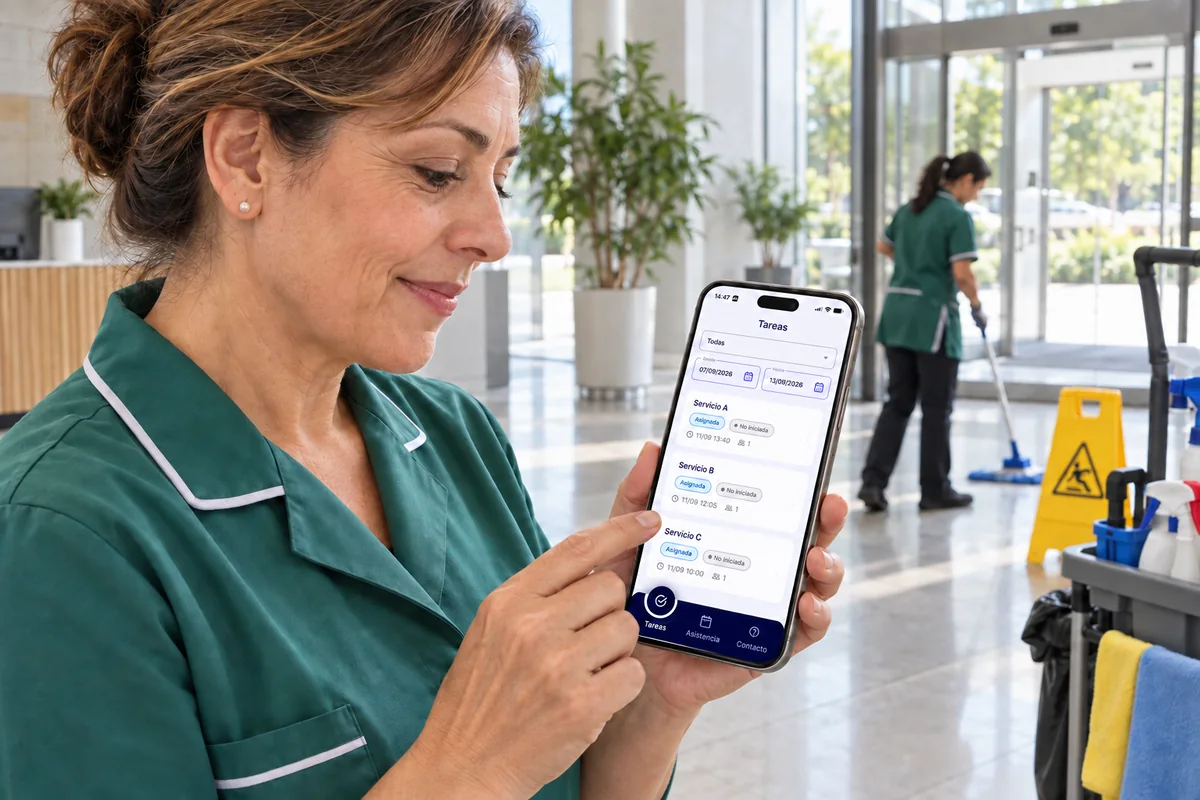
Cleaner in the lobby of an office building checking the week’s list of jobs in the CheckBiz360 app, each with its status, time and assigned people.
Each person with their week on their phone. Scene with the real app screen in a demo environment.
Monday

In a cleaning company, the rota is the first thing to break.

Here the rota is not paperwork: it decides whether there is someone at each site at six tomorrow morning. And it lives split between a spreadsheet, a WhatsApp group and the coordinator’s memory.

  • Rebuilt every week

    One spreadsheet per site, copied, adjusted and sent person by person. And again when someone swaps a shift.

  • The six o’clock absence

    Someone does not make the early shift and you have to find who is free by calling one by one, with the client about to open.

  • Nobody has the right version

    The last-minute change never reaches the person it was meant for, and everyone works from whatever rota they saved.

The right rota is the one each person has on their phone. And clocks in against.

Rotas per site

Each cleaning site with its week. Each person with theirs on their phone.

Set the site to «By shifts» and its schedule is the shifts you load, week by week. If it is not on the rota, nobody works: a day with no shifts is off.

  1. By shifts at each site

    Early, late and weekend shifts, and split days with two shifts. Admin staff on fixed hours stay on «Standard week» from their profile.

  2. Copy and adjust

    «Copy to next week» builds the month in one click. Then you change only what changes.

  3. From the usual spreadsheet

    One template per site and week, with a tab per person. Before saving you see what will happen to each one; correcting it means uploading again, with nothing duplicated.

  4. On their phone, and what they clock in against

    Each person sees their shifts with the clock-in and clock-out reminder, and clocks in against their shift. Those who do not use the phone get their schedule by email on Sunday.

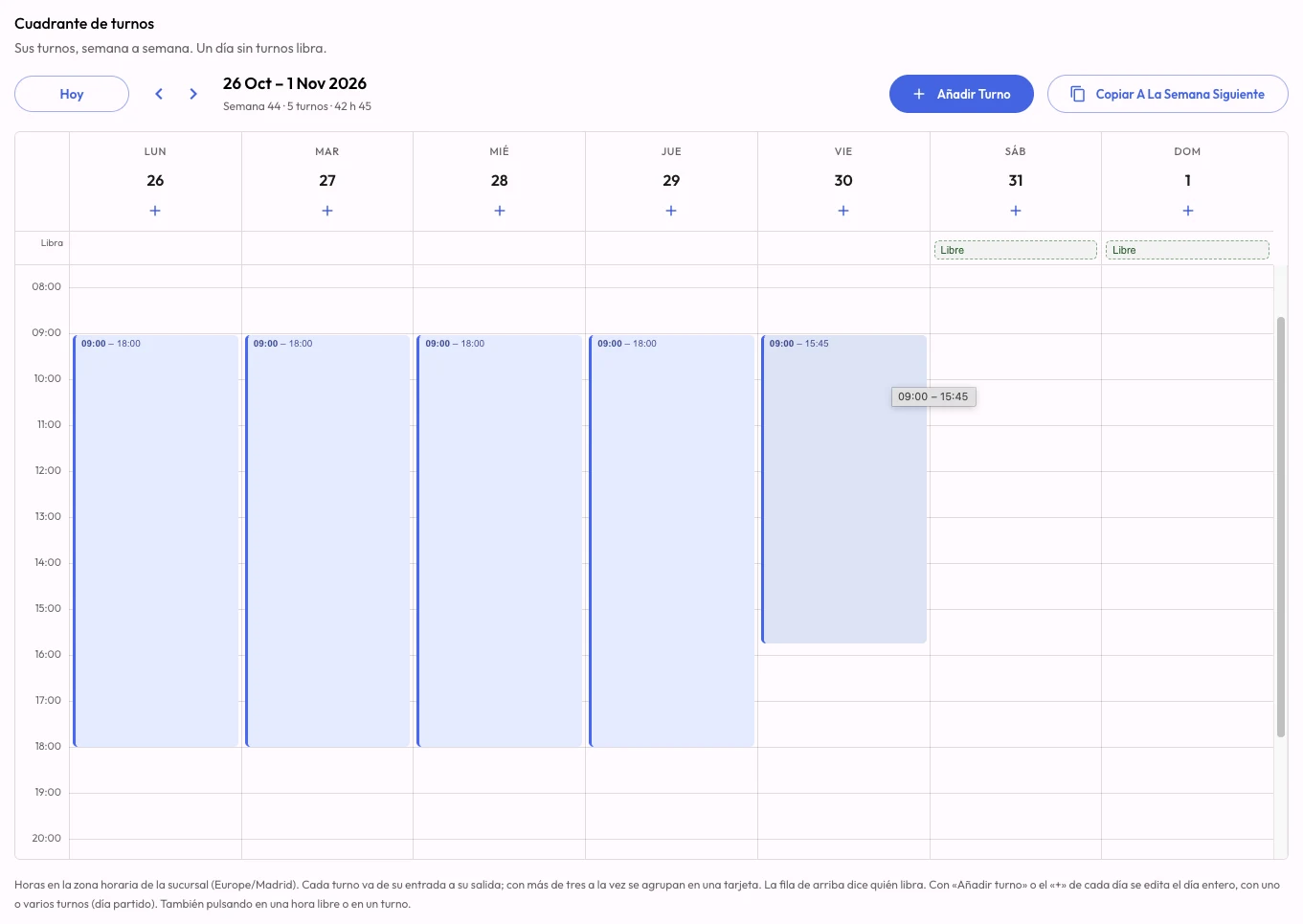
CheckBiz360 shift roster in the dashboard: a week with a shift from Monday to Friday, Saturday and Sunday off, and the Add shift and Copy to next week buttons.
The shift roster: each day with its shifts, days off at the top and «Copy to next week» to build the month. Real dashboard screenshot.
Your AI operations manager

Ask Claude or ChatGPT. It gets done in CheckBiz360.

Building the week, onboarding new people, knowing who hasn’t clocked in this morning and who can cover them: the work that eats the afternoons of whoever runs the operation. Connect CheckBiz360 to your assistant and ask in your own words. It prepares everything with your permissions, shows you what it’s about to do and saves nothing until you say yes.

Things you can ask

  • Lucía has not clocked in at Offices North. Who can cover her six o’clock shift?
  • Build Hospital South’s week like last week, but Marta is off on Thursday.
  • Upload this rota: it is next week’s spreadsheet.
  • How are we doing today? Which site should I check first?
Sample conversationIllustrative
  1. You

    Lucía hasn’t clocked in and she has the 10:00 service at North Site. Who can cover her?

  2. Assistant

    For today’s 10:00 to 12:00 service at North Site:

    Free
    Marta R. · shift 8:00 to 15:00, nothing scheduled at that time.
    With caveats
    Pablo S. · has another service until 10:30.
    Unavailable
    Andrés L. · on holiday.

    Who should I assign it to?

  3. You

    Marta.

  4. Assistant

    10:00 to 12:00 service at North Site. Before: Lucía G. After: Marta R. Shall I apply it?

  5. You

    Yes.

  6. Assistant

    Done. Marta already has the service on her phone.

Answers come from your company’s data in CheckBiz360. Names and sites are made up for the example.

  1. Connect

    Once, with a single address that works for every company you manage. Two minutes.

  2. Ask

    In Claude or ChatGPT, in your own words: “how are we doing today?”, “build”, “change”, “onboard”, “who…?”.

  3. Review and confirm

    It shows you what it’s about to do, with the before and after. It only applies it when you say yes.

What protects you

  • It acts with your permissions, checked on every request: nothing you couldn’t do yourself in the dashboard.
  • Nothing is saved without your confirmation. Close the conversation without a yes and nothing happens.
  • You can see which assistants are connected to your company and disconnect them from Tools instantly.

For owners and administrators with two-factor authentication enabled. You need your own Claude or ChatGPT account; a company account is advisable, because your operation’s data travels to that service.

Beyond the rota

What a cleaning company loses today between calls and WhatsApp.

The rota says who should be there. The rest of the platform says who is there, what was done and what has happened at each site.

  1. Knowing every site is covered

    Who has clocked in at each site, without calling anyone.

    Clocking in happens at the site, inside its geofence and against the day’s shift. When you open the dashboard you see how many people are at each site and who has not clocked in, and each alert takes you to the screen where it is fixed.

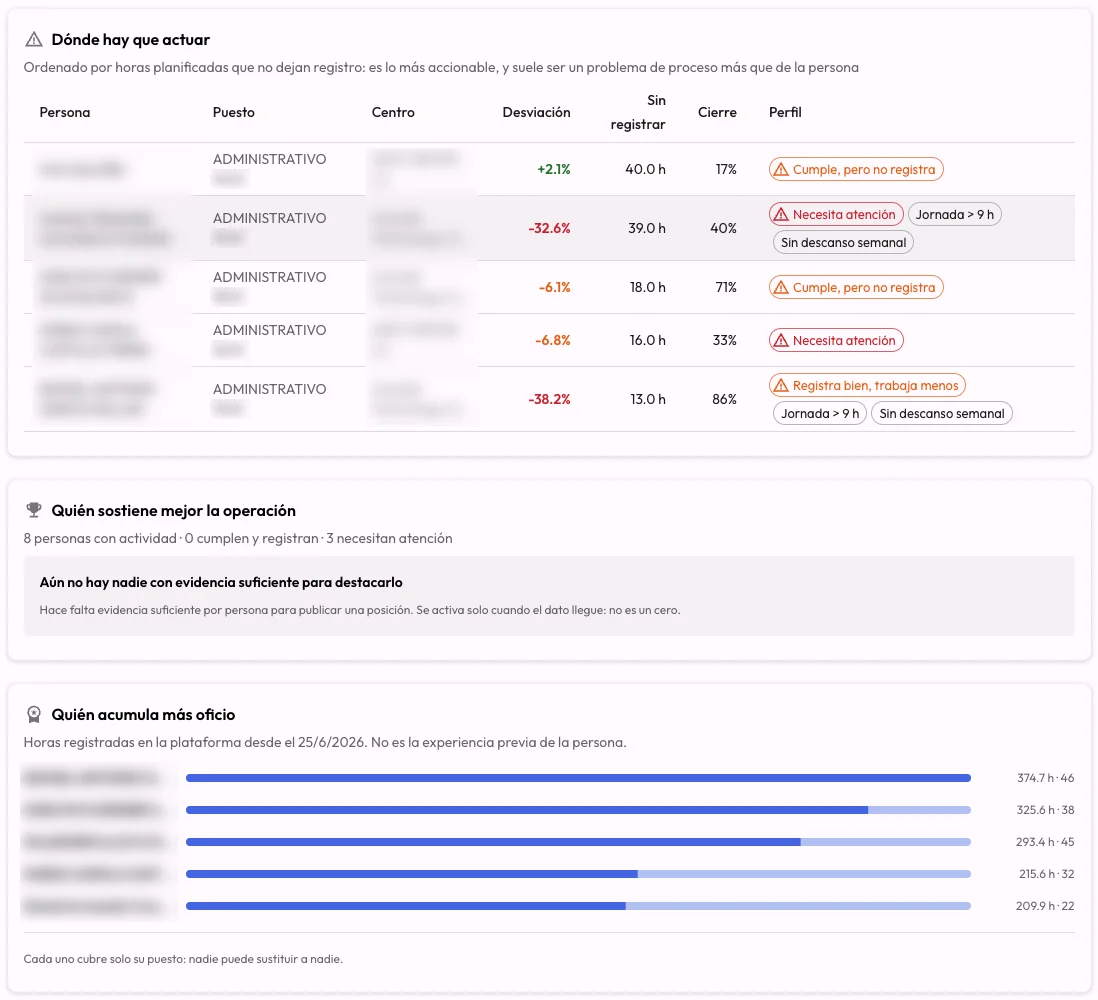
    Employees view of the CheckBiz360 Operations dashboard: where action is needed, with each person’s deviation, unrecorded hours and day closure; who holds the operation together and who has the most hours. Names and companies blurred.
    The Operations dashboard: where action is needed, with each person’s unrecorded hours. Real screenshot; names and companies blurred.
  2. Showing the client it was done

    Every job, with its proof.

    Each job can be a task with its time, its site and photos or video as evidence, reviewed and validated by the supervisor. The tasks report in Excel brings together what was done at each site to show the client.

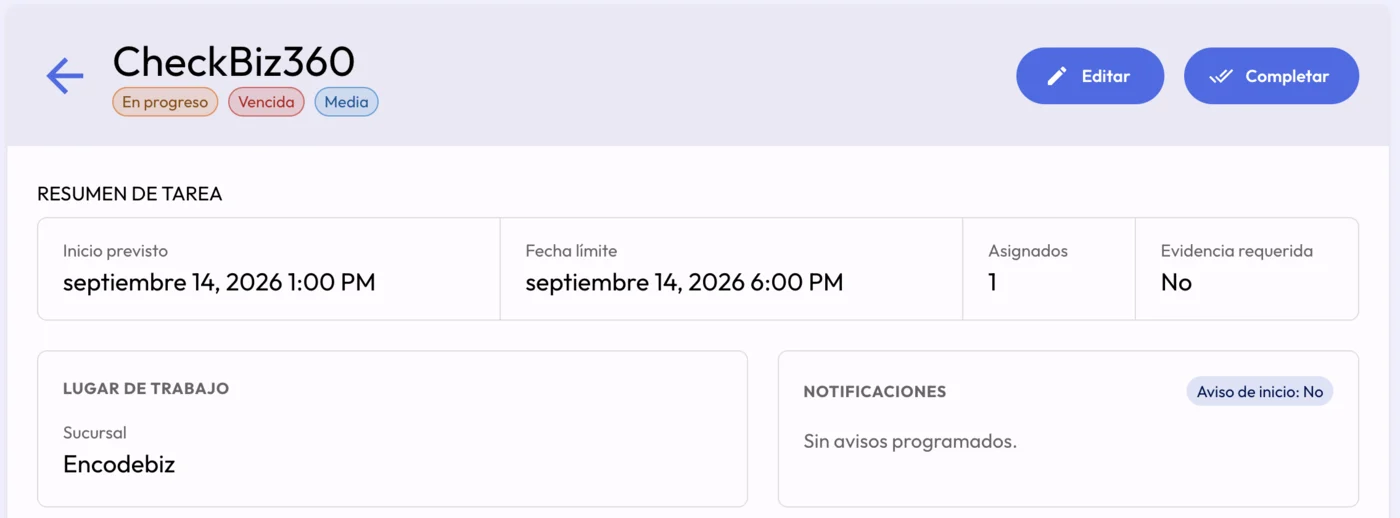
    Task detail in the CheckBiz360 dashboard: status in progress, deadline overdue and medium priority, with planned start, due date, branch and the edit and complete actions.
    A task’s detail in the dashboard: its status and deadline compliance, shown separately. Real screenshot.
  3. Issues from the site

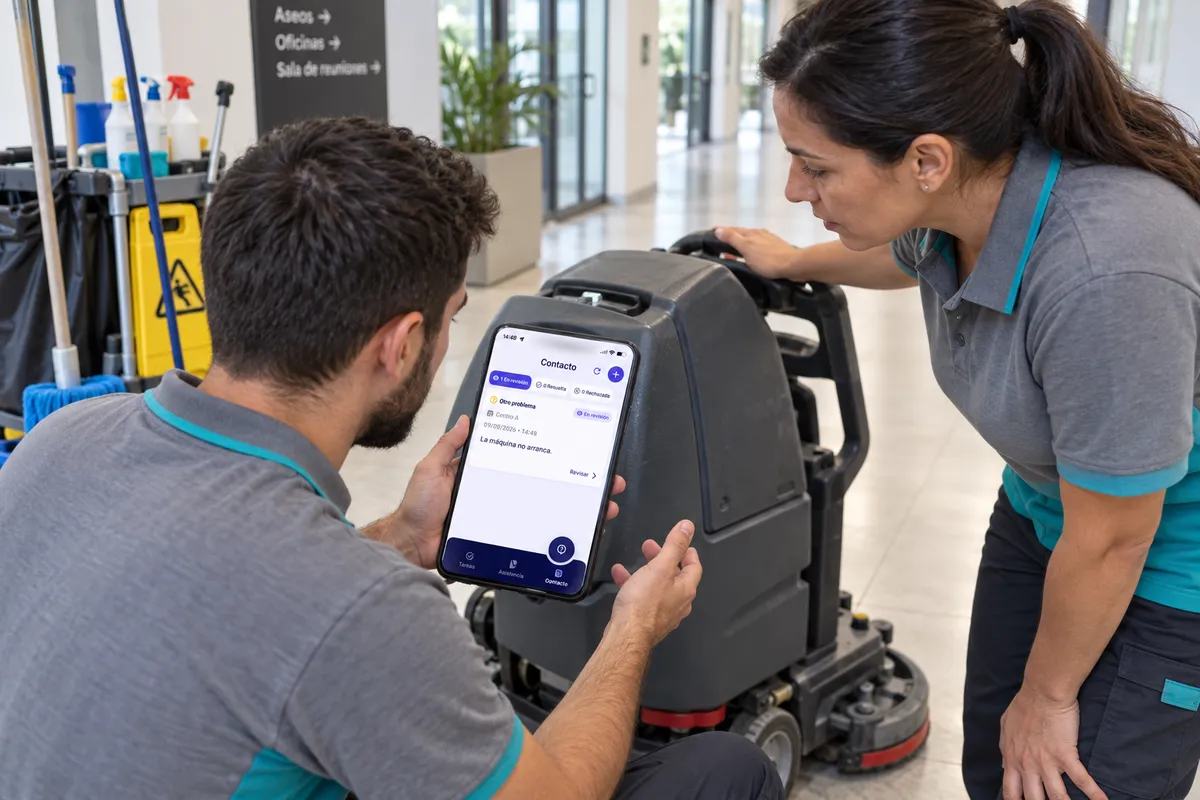
    The machine that will not start does not stay in a voice note.

    It is opened from the app with its site and description, and followed until it is resolved: pending, under review or resolved, with replies in a thread. Whoever opened it can see its status.

    Two cleaning operatives next to a floor scrubber check in the CheckBiz360 app an issue opened from Site A, under review: the machine will not start.
    An issue opened from the site, under review. Scene with the real app screen in a demo environment.
Book a demo
And the rest of the day

What else weighs on a cleaning company.

  • New starters sent by the payroll firm

    Upload the list or the spreadsheet and add the people and the sites in one go. The app welcome is sent once you have checked everything is right.

  • The cost of each site

    With each person’s rate at each site, the dashboard shows what the day is costing per site, and the analysis compares hours and costs.

  • Staff without a phone can clock in too

    The clock-in point turns a tablet at the site into a shared station: each person clocks in with their QR or code and a photo of each clock-in is kept. Billed separately.

  • Compliant time records

    Time records that cannot be deleted. A manager’s correction does not apply until the person accepts it, and the attendance report comes out as PDF or Excel.

  • Products and machinery

    With the Inventory add-on: consumables per site and task, and machines with their inspections and expiry alerts. Billed separately.

  • Leave without paperwork

    Each person requests it from «My calendar» in the app, it is approved in the dashboard and those days become days off in their schedule.

Plans

Start with what you need today. Scale up as you grow.

Bronze brings together teams, tasks, time tracking, documents and AI analysis. Bespoke integrations are assessed under Enterprise.

€5€2per employee per month2026 rate

Subscribe at €2 per employee per month up to and including 31 December 2026, and keep your rate. From 01/01/2027, new subscriptions will be charged €5.

15-day trial on your first subscription · Onboarding and training included.

The clock-in point and the inventory add-on are billed separately. We review their scope and price in the demo.

We review our rates once a year so we can keep developing the platform. Any change is announced in advance.

Bronze

Your sites and your team, under control.

€5€2per employee per month

Subscribing up to and including 31/12/2026. You keep your rate.

  • Rotas per site: by shifts, by tasks or standard week.
  • Clocking in from the phone with a geofence at each site.
  • Jobs as tasks, with photos or video and supervisor review.
  • Issues from the site, with their follow-up.
  • Cost per site and operational analysis with an AI assistant.
  • Documents with read confirmation and expiry alerts.
See all Bronze plan features

Records and legal compliance

  • Clock-in with geolocation (GPS/geofence) and biometric check.
  • Tracking of hours worked.
  • Reusable team templates and an availability board for each site.
  • Assignment of employees to the available site/project.
  • Setup of public holidays, leave and scheduled absences.
  • Ticketing system for incidents, reports and direct communication.
  • Reports and export (CSV).

Task management

  • Task assignment to one or several workers by shift, site or project.
  • Evidence attached from the app: photo or video of the work done.
  • Supervision with approval or rejection of each task from the dashboard.
  • Worker rating from 1 to 5, with a comment.
  • Tasks with their own location, pauses and execution history.
  • Automatic alert when a task doesn’t start on time.
  • Task report exportable to Excel.

Document management

  • Documents by company, site or employee: payslips, contracts, certificates, policies, risk prevention and more.
  • Visibility by role: worker, supervisor or manager.
  • Signed confirmations from the phone, linked to the document version, with downloadable signing records.
  • Expiry dates, archiving, search and filters.
  • Private storage with downloads via temporary signed links.

Analysis and performance control

  • Statistics and comparative reports across sites/projects.
  • Behaviour patterns at employee and site level.
  • Insights based on heuristic metrics and patterns updated daily, to improve performance and surface hidden costs.
  • AI assistant included, to analyse the operation and support coordination decisions.
  • Standard support: defined response times + operational help.
Book your demo
Bespoke
Enterprise

A solution tailored to your cleaning company.

Built for companies with 100+ employees.

  • Everything in the Bronze plan.
  • Full support (priority channels).
  • ERP/CRM integrations and bespoke development (by agreement).
  • Webhook integrations.
Book your demo

We set it up for you and train your team. At no extra cost and with no lock-in to get started.

Prefer to create the account yourself? Sign up here

Frequently asked questions

Does it work for early, late and weekend shifts?

Yes. On «By shifts» each day carries its shifts, with split days of two shifts, and a day with no shifts is off. The week is copied to the next and adjusted, or uploaded from a spreadsheet.

Does it generate rotations automatically?

No. The rotation is not calculated for you: you build one week, copy it to the next with one click and adjust what changes. No schedule needs changing when moving from one week to the next.

What if some of the team have no smartphone or do not want the app?

They can clock in at the site’s clock-in point, a tablet where each person clocks in with their QR or code and a photo of each clock-in is kept; it is billed separately. And with the email notifications switch they receive their week’s schedule on Sunday.

How do I organise several clients and sites?

Each site is a branch, with its address, geofence, managers and rota. A person can work at several sites, with their own rate at each one.

How do I show the client the job was done?

With clocking in at the site, the task for each job with its photos or video reviewed by the supervisor, the attendance report as PDF or Excel and the tasks report in Excel.

Who can build the rota?

The company owner and administrators, and each site’s supervisors. It can also be requested from the operations manager in Claude or ChatGPT, which prepares the proposal and saves nothing until you say yes.

Demo

Bring the rota for one of your sites. We will build it in front of you.

Tell us how many sites you run and how you build the week today. In the demo we load your rota into a demo company and see how an absence gets covered.

Book a demo
Prefer to message us first?Message us on WhatsApp
Message us on WhatsAppBook a demo